Event System
Seizen Table includes a built-in event bus that enables communication between the table, plugins, and your application code. The event system is designed to be:
- Type-safe — Full TypeScript support with module augmentation for custom events
- Decoupled — Components communicate without direct dependencies
- Extensible — Plugins can define and emit their own custom events
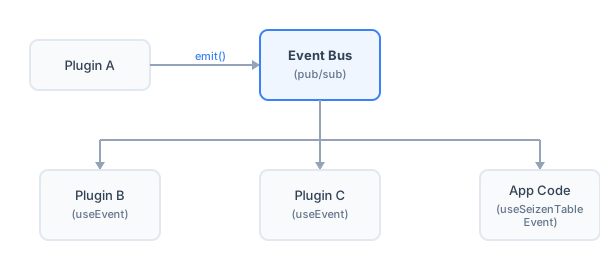
Subscribing to Events
Section titled “Subscribing to Events”Use the useSeizenTableEvent hook to subscribe to events from your application code. This works for both built-in events and custom events emitted by plugins:
import { useSeizenTable, useSeizenTableEvent, SeizenTable } from "@izumisy/seizen-table";
function App() {  const table = useSeizenTable({ data, columns });
  // Subscribe to built-in row-click events  useSeizenTableEvent(table, "row-click", (row) => {    console.log("Row clicked:", row);  });
  // Subscribe to built-in selection changes  useSeizenTableEvent(table, "selection-change", (selectedRows) => {    console.log("Selection changed:", selectedRows);  });
  // Subscribe to custom events from plugins (e.g., file-export plugin)  useSeizenTableEvent(table, "file-export:completed", (payload) => {    console.log("Export completed:", payload.filename);  });
  return <SeizenTable table={table} />;}
The hook automatically handles subscription cleanup when the component unmounts.
Built-in Events
Section titled “Built-in Events”Seizen Table emits the following events automatically:
| Event | Payload | Description |
|---|---|---|
data-change | TData[] | Emitted when table data changes |
selection-change | TData[] | Emitted when row selection changes |
filter-change | ColumnFiltersState | Emitted when column filters change |
sorting-change | SortingState | Emitted when sorting changes |
pagination-change | PaginationState | Emitted when pagination changes |
row-click | TData | Emitted when a table row is clicked |
cell-context-menu | { cell, column, row, value } | Emitted when cell context menu opens |
column-context-menu | { column } | Emitted when column header context menu opens |
Custom Events with Module Augmentation
Section titled “Custom Events with Module Augmentation”Plugins can define custom events using TypeScript’s module augmentation. This ensures type safety across your entire application.
Defining Custom Events
Section titled “Defining Custom Events”In your plugin file, extend the EventBusRegistry interface:
declare module "@izumisy/seizen-table/plugin" { interface EventBusRegistry { "my-plugin:action": { itemId: string; action: "create" | "delete" }; "my-plugin:complete": { success: boolean }; }}Emitting Custom Events
Section titled “Emitting Custom Events”Inside a plugin, use the emit function from the plugin context:
import { definePlugin } from "@izumisy/seizen-table/plugin";
export const myPlugin = definePlugin(() => ({  name: "my-plugin",  slots: {    header: ({ emit }) => {      const handleAction = () => {        // Type-safe! TypeScript knows the payload shape        emit("my-plugin:action", { itemId: "123", action: "create" });      };
      return <button onClick={handleAction}>Create Item</button>;    },  },}));
Subscribing to Custom Events
Section titled “Subscribing to Custom Events”Once declared, custom events are fully type-safe when subscribing from your application code:
// In your application codeuseSeizenTableEvent(table, "my-plugin:action", (payload) => { // TypeScript knows: payload is { itemId: string; action: "create" | "delete" } console.log(`Action ${payload.action} on item ${payload.itemId}`);});Best Practices
Section titled “Best Practices”1. Use Descriptive Event Names
Section titled “1. Use Descriptive Event Names”// ✅ Good: Clear namespace and action"file-export:started""file-export:completed""file-export:error"
// ❌ Avoid: Vague or conflicting names"start""done""click"2. Keep Payloads Serializable
Section titled “2. Keep Payloads Serializable”Event payloads should be plain objects that can be easily logged, stored, or transmitted:
// ✅ Good: Plain serializable objectemit("row-detail:opened", { rowId: row.id, timestamp: Date.now() });
// ❌ Avoid: Complex objects or functionsemit("row-detail:opened", { row, onClose: () => {} });
3. Document Your Events
Section titled “3. Document Your Events”When creating plugins, document the events they emit:
/** * Events emitted by the file-export plugin: * * - `file-export:started` - Emitted when export begins * - `file-export:progress` - Emitted with progress updates * - `file-export:completed` - Emitted when export finishes successfully * - `file-export:error` - Emitted when export fails */declare module "@izumisy/seizen-table/plugin" { interface EventBusRegistry { "file-export:started": { format: "csv" | "json" }; "file-export:progress": { percent: number }; "file-export:completed": { filename: string; size: number }; "file-export:error": { message: string }; }}4. Place useEvent at the Right Component Level
Section titled “4. Place useEvent at the Right Component Level”For example, if your plugin listens to events from context menu actions, place useEvent in the top-level panel component, not in child components that may be conditionally rendered:
// ❌ Bad: useEvent in a child component that's conditionally renderedfunction VisibilityTab() {  const { useEvent, table } = usePluginContext();
  // This only receives events when the Visibility tab is active!  useEvent("column:hide-request", (payload) => {    table.setColumnVisibility({ [payload.columnId]: false });  });
  return <div>...</div>;}
function ColumnControlPanel() {  const [activeTab, setActiveTab] = useState("visibility");
  return (    <div>      {activeTab === "visibility" && <VisibilityTab />}      {activeTab === "sorter" && <SorterTab />}    </div>  );}
// ✅ Good: useEvent in the top-level panel componentfunction ColumnControlPanel() { const { useEvent, table } = usePluginContext(); const [activeTab, setActiveTab] = useState("visibility");
// Always mounted, always receives events useEvent("column:hide-request", (payload) => { table.setColumnVisibility({ [payload.columnId]: false }); });
useEvent("column:sort-request", (payload) => { // Handle sort request... });
return ( <div> {activeTab === "visibility" && <VisibilityTab />} {activeTab === "sorter" && <SorterTab />} </div> );}Events in Plugins
Section titled “Events in Plugins”Inside plugins, use the useEvent hook from the plugin context to subscribe to events:
import { definePlugin } from "@izumisy/seizen-table/plugin";
export const analyticsPlugin = definePlugin(() => ({  name: "analytics",  slots: {    // This slot doesn't render anything, just listens for events    footer: ({ useEvent }) => {      useEvent("row-click", (row) => {        trackEvent("table_row_clicked", { rowId: row.id });      });
      useEvent("filter-change", (filters) => {        trackEvent("table_filtered", { filterCount: filters.length });      });
      return null; // No UI to render    },  },}));