Plugin System
Design Philosophy
Section titled “Design Philosophy”Seizen Table is built on a plugin-first architecture. Unlike traditional component libraries that bundle all features into a monolithic package, every feature in Seizen — including official ones — is implemented as a plugin.
This architecture is inspired by modern editor ecosystems like VS Code, where the core remains minimal and all rich functionality comes from extensions. The same principle applies here:
- The core SeizenTable does one thing well: rendering tabular data with essential interactions (sorting, selection, pagination)
- Everything else is a plugin: filtering, row details, column controls, data export, and any custom feature you need
Why Plugin-First?
Section titled “Why Plugin-First?”Bundle size optimization — Your users only download the features they actually use. A simple read-only table ships minimal JavaScript, while a feature-rich admin dashboard includes more.
Consistent mental model — Whether you’re using an official plugin or building a custom one, the API is identical. There’s no “magic” built-in behavior that works differently from user-land code.
Escape hatches by default — Since official features use the same plugin primitives available to you, you can always fork, extend, or replace any behavior. Nothing is locked away in private APIs.
Composability — Plugins can be combined freely. Need filtering in a side panel with row details in an inline row? Just configure both plugins. The slot system ensures they work together seamlessly.
Layout & Slots
Section titled “Layout & Slots”SeizenTable provides 5 slots where plugins can render UI components:
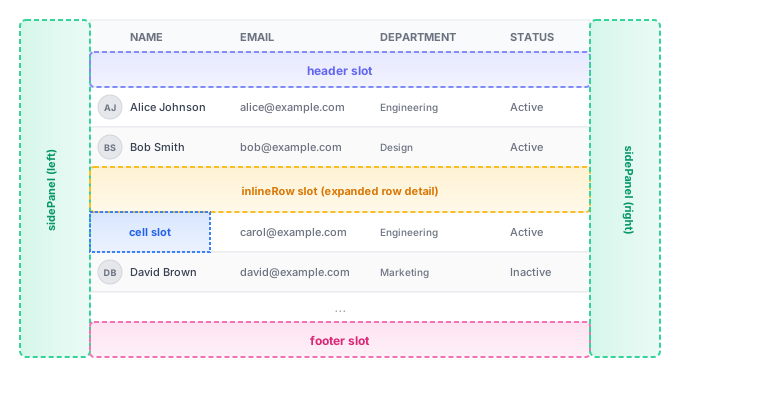
Available Slots
Section titled “Available Slots”| Slot | Description | Rendering Strategy |
|---|---|---|
sidePanel | IDE-style vertical tab panel (left or right) | Tab-based toggle |
header | Between table header row and body rows | Sequential (all plugins) |
footer | Below the table | Sequential (all plugins) |
cell | Custom cell renderer for all columns | First match wins |
inlineRow | Expandable sub-row below a specific row | First match wins |
Slot Rendering Strategies
Section titled “Slot Rendering Strategies”- Tab-based toggle: Only one side panel can be active at a time per position
- Sequential: All plugins with this slot render in registration order
- First match wins: Only the first plugin with this slot renders
Using Plugins
Section titled “Using Plugins”import { useSeizenTable, SeizenTable } from "@izumisy/seizen-table";import { RowDetailPlugin } from "@izumisy/seizen-table-plugins/row-detail";import { FilterPlugin } from "@izumisy/seizen-table-plugins/filter";
function UsersTable() { const table = useSeizenTable({ data, columns, plugins: [ RowDetailPlugin.configure({ width: 350 }), FilterPlugin.configure({ width: 320 }), ], });
return <SeizenTable table={table} />;}Creating Custom Plugins
Section titled “Creating Custom Plugins”Import Path
Section titled “Import Path”All plugin development utilities are exported from a dedicated subpath:
import { definePlugin, usePluginContext, usePluginArgs, cellContextMenuItem, columnContextMenuItem, type PluginContext, type PluginContextValue, type PluginColumnInfo,} from "@izumisy/seizen-table/plugin";Plugin Structure Overview
Section titled “Plugin Structure Overview”A plugin is created using definePlugin() which returns a factory with a configure() method.
Important: Plugin components should access their configuration via usePluginArgs() hook to maintain stable component identity.
import { z } from "zod";import { definePlugin, usePluginArgs } from "@izumisy/seizen-table/plugin";
const MyPluginSchema = z.object({  // Configuration options with Zod validation  width: z.number().default(300),});
type MyPluginConfig = z.infer<typeof MyPluginSchema>;
// Define component at module level with stable referencefunction MyPluginPanel() {  const args = usePluginArgs<MyPluginConfig>(); // Access config via hook  return <div style={{ width: args.width }}>...</div>;}
export const MyPlugin = definePlugin({  id: "my-plugin",           // Unique identifier  name: "My Plugin",         // Display name (shown in side panel tabs)  args: MyPluginSchema,      // Zod schema for configuration  slots: {    sidePanel: {      render: MyPluginPanel, // Pass component directly    },  },  contextMenuItems: { /* ... */ },  // Optional context menu items});
// UsageMyPlugin.configure({ width: 400 })
Slots Reference
Section titled “Slots Reference”SidePanel Slot
Section titled “SidePanel Slot”Renders in a vertical tab panel on the left or right side of the table.
import { z } from "zod";import {  definePlugin,  usePluginContext,  usePluginArgs,} from "@izumisy/seizen-table/plugin";
const SidePanelSchema = z.object({  width: z.number().default(320),});
type SidePanelConfig = z.infer<typeof SidePanelSchema>;
// Component defined at module level for stable identityfunction SidePanelContent() {  const args = usePluginArgs<SidePanelConfig>();  const { data, selectedRows, useEvent } = usePluginContext();
  // Subscribe to row clicks  useEvent("row-click", (row) => {    console.log("Row clicked:", row);  });
  return (    <div style={{ width: args.width, padding: 16 }}>      <p>Total rows: {data.length}</p>      <p>Selected: {selectedRows.length}</p>    </div>  );}
export const MySidePanelPlugin = definePlugin({  id: "my-side-panel",  name: "My Panel",  args: SidePanelSchema,  slots: {    sidePanel: {      position: "right-sider",  // or "left-sider"      header: "Panel Title",      render: SidePanelContent, // Pass component directly    },  },});
Header & Footer Slots
Section titled “Header & Footer Slots”Render above or below the table body. All plugins with these slots render sequentially.
import { z } from "zod";import { definePlugin, usePluginContext } from "@izumisy/seizen-table/plugin";
function HeaderContent() {  const { data } = usePluginContext();  return <div>Showing {data.length} records</div>;}
function FooterContent() {  return <div>Footer content here</div>;}
export const HeaderFooterPlugin = definePlugin({  id: "header-footer",  name: "Header Footer",  args: z.object({}),  slots: {    header: {      render: HeaderContent,    },    footer: {      render: FooterContent,    },  },});
Cell & InlineRow Slots
Section titled “Cell & InlineRow Slots”Custom renderers for cells and expandable rows. Only the first matching plugin renders.
import { z } from "zod";import { definePlugin } from "@izumisy/seizen-table/plugin";
// Cell renderer receives (cell, column, row) as argumentsfunction CellRenderer(cell: any, column: any, row: any) {  const value = cell.getValue();  return <span style={{ color: "blue" }}>{String(value)}</span>;}
// InlineRow renderer receives (row) as argumentfunction InlineRowRenderer(row: any) {  return <div>Details for row {row.id}</div>;}
export const CellPlugin = definePlugin({  id: "custom-cell",  name: "Custom Cell",  args: z.object({}),  slots: {    cell: {      render: CellRenderer,    },    inlineRow: {      render: InlineRowRenderer,    },  },});
Context Menu Items
Section titled “Context Menu Items”Plugins can add items to cell and column header context menus using cellContextMenuItem and columnContextMenuItem.
Cell Context Menu
Section titled “Cell Context Menu”import { definePlugin, cellContextMenuItem,} from "@izumisy/seizen-table/plugin";
export const CellActionsPlugin = definePlugin({ id: "cell-actions", name: "Cell Actions", args: z.object({ enableCopy: z.boolean().default(true), }), slots: {}, contextMenuItems: { cell: [ cellContextMenuItem("copy-value", (ctx) => ({ label: "Copy value", onClick: () => navigator.clipboard.writeText(String(ctx.value)), visible: ctx.pluginArgs.enableCopy && ctx.value != null, })), cellContextMenuItem("filter-by-value", (ctx) => ({ label: `Filter by "${ctx.value}"`, onClick: () => ctx.column.setFilterValue(ctx.value), })), ], },});The ctx object provides access to the clicked cell, column, row, cell value, selected rows, table instance, plugin configuration, and an emit function for EventBus.
Column Context Menu
Section titled “Column Context Menu”import { definePlugin, columnContextMenuItem,} from "@izumisy/seizen-table/plugin";
export const ColumnActionsPlugin = definePlugin({ id: "column-actions", name: "Column Actions", args: z.object({}), slots: {}, contextMenuItems: { column: [ columnContextMenuItem("hide-column", (ctx) => ({ label: "Hide column", onClick: () => ctx.column.toggleVisibility(false), })), columnContextMenuItem("sort-asc", (ctx) => ({ label: "Sort ascending", onClick: () => ctx.column.toggleSorting(false), visible: ctx.column.getCanSort(), })), columnContextMenuItem("sort-desc", (ctx) => ({ label: "Sort descending", onClick: () => ctx.column.toggleSorting(true), visible: ctx.column.getCanSort(), })), ], },});The ctx object provides access to the clicked column, table instance, plugin configuration, and an emit function for EventBus.
Plugin Context (usePluginContext)
Section titled “Plugin Context (usePluginContext)”Inside plugin components, use usePluginContext() to access table data and APIs.
const { table, // SeizenTableInstance - table methods and state data, // unknown[] - current table data columns, // PluginColumnInfo[] - column info with filter metadata selectedRows, // unknown[] - currently selected rows openArgs, // TOpenArgs | undefined - args passed via table.plugin.open() useEvent, // Hook to subscribe to EventBus events} = usePluginContext();openArgs - Receiving Initial Data
Section titled “openArgs - Receiving Initial Data”When a plugin is opened via table.plugin.open(pluginId, args), the args are available through openArgs:
// Application sidetable.plugin.open("row-detail", { row: clickedRow });
// Inside pluginconst { openArgs } = usePluginContext<"row-detail">();const initialRow = openArgs?.row;
Event Subscription with useEvent
Section titled “Event Subscription with useEvent”Subscribe to built-in and custom events:
const { useEvent } = usePluginContext();
// Built-in eventsuseEvent("row-click", (row) => {  console.log("Row clicked:", row);});
useEvent("selection-change", (selectedRows) => {  console.log("Selection changed:", selectedRows);});
useEvent("filter-change", (filterState) => {  console.log("Filters changed:", filterState);});
Built-in events include data-change, selection-change, filter-change, sorting-change, pagination-change, row-click, cell-context-menu, and column-context-menu.
For more details on the event system, see the Event System guide.
Type-Safe Plugin Args (Module Augmentation)
Section titled “Type-Safe Plugin Args (Module Augmentation)”For type-safe openArgs, extend the PluginArgsRegistry interface:
// In your plugin filedeclare module "@izumisy/seizen-table/plugin" {  interface PluginArgsRegistry {    "my-plugin": { row: MyRowType; mode: "view" | "edit" };  }}
// Now openArgs is typed correctlyconst { openArgs } = usePluginContext<"my-plugin">();// openArgs is typed as { row: MyRowType; mode: "view" | "edit" } | undefined
Custom Events (Module Augmentation)
Section titled “Custom Events (Module Augmentation)”Plugins can define custom events using module augmentation on EventBusRegistry. This enables type-safe inter-plugin communication.
Defining Custom Events
Section titled “Defining Custom Events”// In your plugin filedeclare module "@izumisy/seizen-table/plugin" { interface EventBusRegistry { /** Request to add a filter from context menu */ "filter:add-request": { columnKey: string; value: unknown; }; /** Notify that export is complete */ "export:complete": { format: "csv" | "json"; rowCount: number; }; }}Emitting Custom Events
Section titled “Emitting Custom Events”Use the emit function from context menu handlers:
cellContextMenuItem("add-filter", (ctx) => ({ label: `Filter by "${ctx.value}"`, onClick: () => { ctx.emit("filter:add-request", { columnKey: ctx.column.id, value: ctx.value, }); },}))Subscribing to Custom Events
Section titled “Subscribing to Custom Events”function MyPluginContent() { const { useEvent } = usePluginContext();
useEvent("filter:add-request", ({ columnKey, value }) => { console.log(`Add filter: ${columnKey} = ${value}`); // Handle the filter request });
useEvent("export:complete", ({ format, rowCount }) => { console.log(`Exported ${rowCount} rows as ${format}`); });
return <div>...</div>;}Complete Example
Section titled “Complete Example”Here’s a complete plugin that combines slots, context menu items, and custom events:
import { useState } from "react";import { z } from "zod";import {  definePlugin,  usePluginContext,  usePluginArgs,  cellContextMenuItem,} from "@izumisy/seizen-table/plugin";
// Type-safe plugin argsdeclare module "@izumisy/seizen-table/plugin" {  interface PluginArgsRegistry {    "bulk-actions": { initialSelection?: unknown[] };  }  interface EventBusRegistry {    "bulk-actions:delete": { rows: unknown[] };  }}
const BulkActionsSchema = z.object({  enableDelete: z.boolean().default(true),  enableExport: z.boolean().default(true),});
type BulkActionsConfig = z.infer<typeof BulkActionsSchema>;
// Component defined at module level with stable referencefunction BulkActionsPanel() {  const args = usePluginArgs<BulkActionsConfig>();  const { selectedRows, openArgs, useEvent } = usePluginContext<"bulk-actions">();  const [lastDeleted, setLastDeleted] = useState<number>(0);
  // Subscribe to delete events  useEvent("bulk-actions:delete", ({ rows }) => {    setLastDeleted(rows.length);  });
  if (selectedRows.length === 0) {    return (      <div style={{ padding: 16, color: "#9ca3af" }}>        Select rows to see bulk actions      </div>    );  }
  return (    <div style={{ padding: 16 }}>      <p>{selectedRows.length} rows selected</p>      {args.enableDelete && (        <button onClick={() => console.log("Delete", selectedRows)}>          Delete Selected        </button>      )}      {args.enableExport && (        <button onClick={() => console.log("Export", selectedRows)}>          Export Selected        </button>      )}      {lastDeleted > 0 && <p>Last deleted: {lastDeleted} rows</p>}    </div>  );}
export const BulkActionsPlugin = definePlugin({  id: "bulk-actions",  name: "Bulk Actions",  args: BulkActionsSchema,  slots: {    sidePanel: {      position: "right-sider",      header: "Bulk Actions",      render: BulkActionsPanel, // Stable component reference    },  },  contextMenuItems: {    cell: [      cellContextMenuItem("add-to-selection", (ctx) => ({        label: "Add to bulk selection",        onClick: () => {          ctx.row.toggleSelected(true);        },        visible: !ctx.row.getIsSelected(),      })),      cellContextMenuItem("delete-row", (ctx) => ({        label: "Delete row",        onClick: () => {          ctx.emit("bulk-actions:delete", { rows: [ctx.row.original] });        },        visible: ctx.pluginArgs.enableDelete,      })),    ],  },});